The Open Source Database Client and SQL Editor for Windows
Manage MySQL, PostgreSQL, MongoDB, Redis, SQLite, and 12+ databases from one fast, free desktop app. Browse schemas, run SQL queries, edit rows, and export data with a modern database manager built for developers.
Open DB Studio is a powerful open source SQL client for developers who want a simple, private, and keyboard-first way to work with databases.
Windows 10 / 11 · 64-bit · 78 MB · No account required
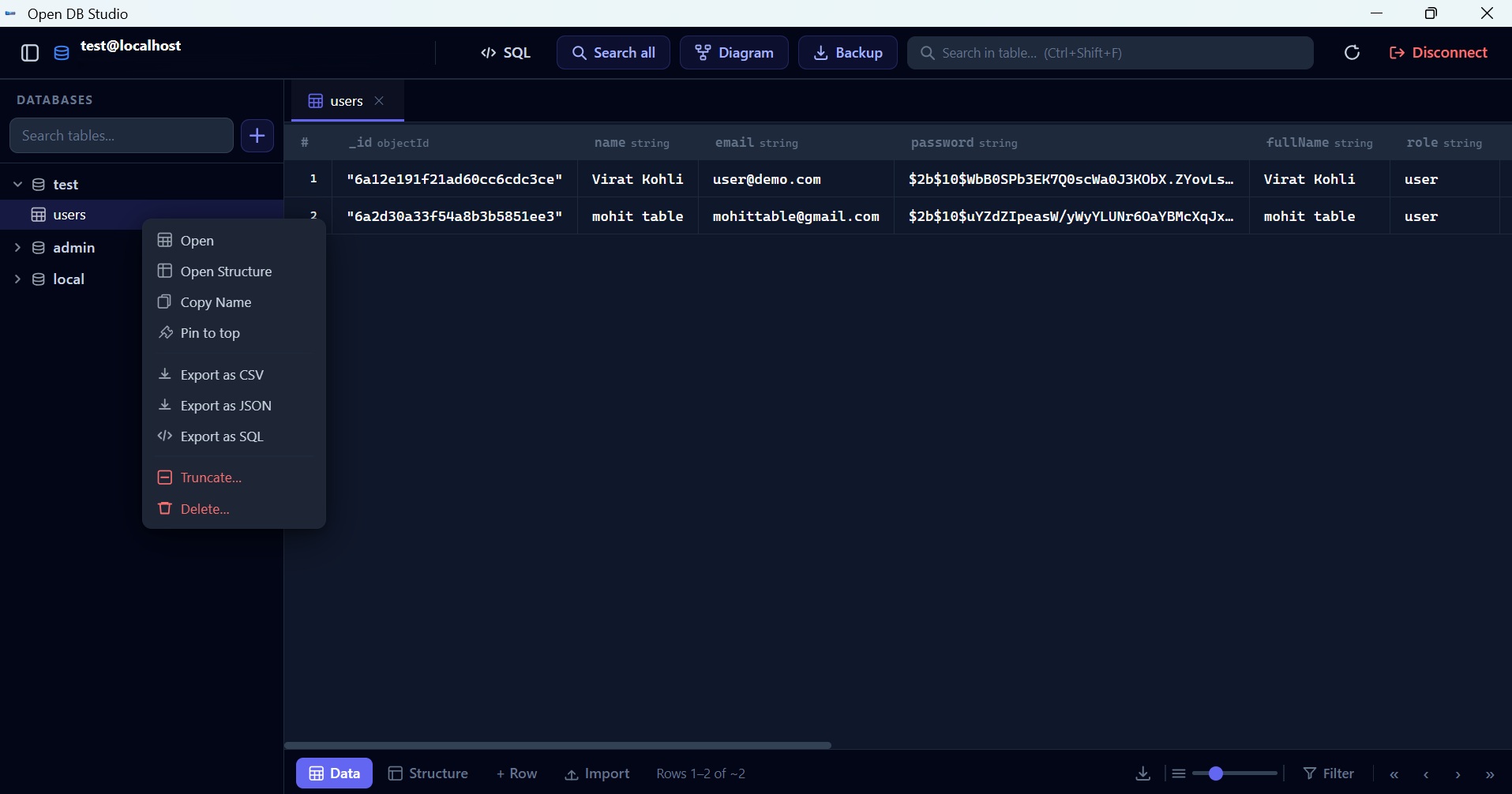
Supports 12+ database engines
12+
Databases Supported
100%
Free & Open Source
0
Telemetry / Tracking
78MB
Installer Size
Features
A fast SQL client for MySQL, PostgreSQL, MongoDB, and more
Open DB Studio gives developers a clean database manager with inline editing, advanced filters, safe mode, and a powerful SQL editor for MySQL, PostgreSQL, Redis, SQLite, and other popular databases.
Inline Editing
Click any cell to edit data directly — no extra dialogs, no roundtrips.
Advanced Filters
Multi-column AND/OR filters to find exactly what you need in seconds.
Code Review
Preview every change as a diff before it commits to the database.
Safe Mode
Require explicit confirmation before any destructive operation runs.
SQL Editor
Autocomplete, syntax highlighting, query formatter, and full history.
Export Data
Export any table or query result to CSV, JSON, or SQL instantly.
12+ Databases
MySQL, PostgreSQL, MongoDB, Redis, SQLite, SQL Server, and more.
Keyboard-First
Every action has a shortcut. Built for power users who prefer the keyboard.
Get Started
Connect to PostgreSQL, MySQL, Redis, and more in 3 simple steps
From download to querying your database in under a minute with a modern database client built for developers.
Download & Install
One-click installer for Windows 10/11. No dependencies, no account, no setup wizard.
Add Your Connection
Paste a connection URL or fill in host, port, user, password. Saved securely on your machine.
Browse & Query
Explore tables, run SQL, edit rows inline, and export results — all from one clean interface.
SQL Editor
Write SQL faster with a powerful database editor
Open DB Studio includes a full-featured SQL editor with autocomplete, syntax highlighting, query formatter, and complete history for PostgreSQL, MySQL, SQLite, Redis, and other databases.
| id | name | order_count | |
|---|---|---|---|
| 1 | Alice Johnson | alice@corp.com | 14 |
| 2 | Bob Smith | bob@corp.com | 9 |
| 4 | Dave Brown | dave@corp.com | 6 |
Developers Love It
Trusted by developers worldwide
Here's what people are saying about Open DB Studio.
Replaced OtherDb with ODS on day one. The SQL editor autocomplete is surprisingly good and the inline editing saves me 30 minutes a day.
Arjun Mehta
Backend Engineer
Finally a database client that doesn't feel like enterprise bloatware. Clean, fast, and completely free — exactly what I needed.
Sara Kim
DevOps Lead
Connecting to Redis and MySQL in the same app is a game changer. No more switching between 3 different tools just to check my data.
Lucas Ferreira
Full Stack Developer
Why Open DB Studio
Built different, by design
Every advantage below is free, built-in, and here to stay.
Always Free
No paid plans, no trial expiry. Free forever, for everyone.
100% Open Source
MIT licensed. Read the code, fork it, contribute — full transparency.
12+ Databases
MySQL, PostgreSQL, MongoDB, Redis, SQLite and more — all in one app.
Zero Telemetry
No analytics, no tracking, no cloud sync. Your data stays on your machine.
No Account Needed
Download, install, connect. No sign-up, no email, no waiting.
Inline Editing
Edit cells directly in the table view — no dialogs, no extra steps.
Safe Mode
Confirm before every destructive operation. No accidental deletes.
One-Click Export
Export any table or query result to CSV, JSON, or SQL instantly.
Why ODS
Built with the right priorities
Every design decision flows from what developers actually need.
Fast & Responsive
Paginated queries, lazy loading, and instant results — even on large datasets.
Privacy First
Your data never leaves your machine. No cloud sync, no telemetry, no tracking.
Developer-Focused
SQL editor, query history, schema browser, and keyboard shortcuts built in.
Free to Start
No time limit on the free trial. Download and start exploring today.
Free forever. Open forever.
Open DB Studio is MIT licensed. View the source, report bugs, suggest features, or contribute — the project belongs to the community.
Available for Windows
Native installer for Windows 10 and 11 (64-bit). Download once, use forever.
Windows
Windows 10 / 11 · 64-bit · 78 MB
Ready to manage your databases the right way?
Free trial with no time limit. No account needed. Just download and connect.